Proposals
The Proposals page is the curator’s in-tray to you. The curator applies any change it is confident about on its own; a change whose confidence falls below the auto-apply threshold in Curator settings is held back here for a human to decide. Archives and splits follow the same rule.
When the threshold is 0, the curator applies every change itself and no new proposals arrive. The page says so at the top, with a link to the setting, so an empty queue is not mistaken for a stalled curator.
What you’ll see
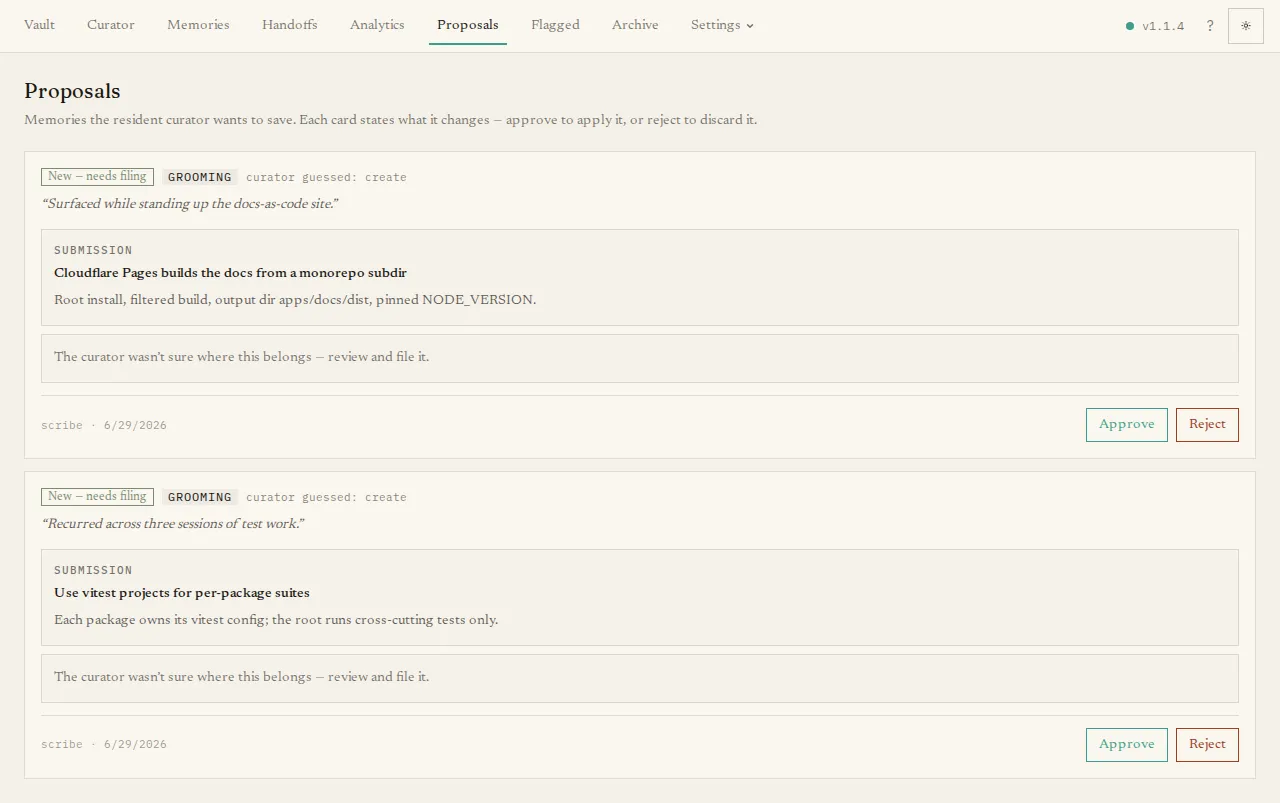
Section titled “What you’ll see”Each proposal is a card describing one change the curator wants to make. A card shows:
- a badge naming the action — Update, Replace, Merge, Split, Move, or New;
- a source chip saying whether it came from intake (filing a new submission) or grooming (tidying the existing collection);
- the curator’s reasoning for the change; and
- the before and after — for a simple edit, the old text, a diff, and the new text side by side; for a merge, the several sources and the merged result; for a split, the original and its replacements.
A Move card shows the memory and its source → destination shelves instead of a content diff. Shelf labels are display text; hover them to recover the stable shelf id.
The curator’s plan
Section titled “The curator’s plan”When an intake submission lands in the queue — whether below the shared auto-apply threshold or because it needs review regardless of confidence — the card also shows the curator’s plan for eligible create/update submissions: exactly what it wanted to do:
- “Wanted to augment ‹Elaine› with: …” — with a preview diff of the target memory as it would look if the plan were applied;
- “Wanted to replace ‹Coffee› with: …” — with the old → planned diff;
- “Wanted to file a new memory:” — with the curated title, body, and tags.
The judgment’s confidence appears beneath the plan. If the memory the plan points at has since been archived or deleted, the panel says so instead of showing a preview.
Resolving a proposal
Section titled “Resolving a proposal”The buttons on a card depend on what the curator planned:
- Approve as augment of ‹X› / Approve — replaces ‹X› — execute the plan exactly as previewed: the target memory is updated and the proposal leaves the queue. If the target has drifted or disappeared since the judgment, the button is disabled with the reason and nothing is touched.
- Apply move — move the active memory to the displayed destination and archive the proposal as resolved. If the source, destination, target state, or destination path has changed, nothing moves and the proposal remains available to reject.
- Approve curated version / Approve raw submission — for a planned new memory: activate the curator’s cleaned-up title/body/tags, or the submission exactly as it arrived.
- Approve — on a plan-less card (grooming proposals, older proposals), the label spells out the consequence (Approve — replaces 1 memory, Approve — merges 3 memories, and so on).
- Discuss this proposal — open the curator chat grounded in this proposal, its plan, and its target. Ask why, or steer it to a different action; confirming a chat-proposed fix also clears the proposal from the queue.
- Reject & make an example — on intake proposals: reject it and teach the curator not to extract things like it again. See Reviewing & accepting proposals.
- Reject — discards the suggestion silently and leaves things as they were.
For a split that produces several new memories, an Archive original button appears below the replacements so you can retire the source in one click once you are happy with the pieces.
Corrections for flagged memories
Section titled “Corrections for flagged memories”When the curator fixes a flagged memory but is not confident enough to apply the fix itself, the fix arrives here as an ordinary update, marked Fixes a flagged memory and listing the flags it addresses.
- Approve — replace the memory with the corrected version and close its flags.
- Reject — keep the original. Its flags stay on the Flagged page, marked as declined, and the curator does not propose the same fix again unless you ask it to.
When the queue is empty it simply says No proposals pending — that is the goal state.
For a step-by-step walkthrough of how to judge a proposal, see Reviewing & accepting proposals.